Learn how common roof interfaces change the parts needed for an ordinary crossbar system, and how to verify a complete vehicle-specific fit.
On this page
Roof Types and the Ordinary Base-Rack Component Path
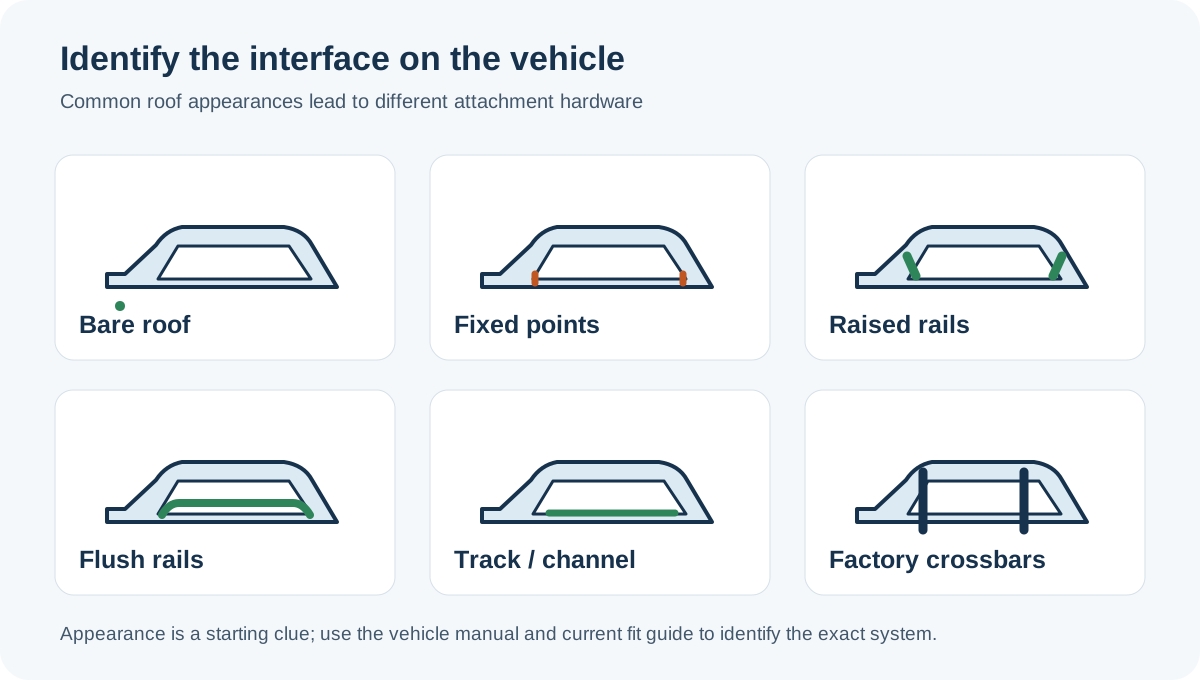
A roof rack is a system attached to a particular vehicle roof, not just a pair of bars. Before shopping, identify what the vehicle actually has: bare roof, raised or flush rails, fixed mounting points, tracks, or factory crossbars. Similar-looking roofs can use different attachment hardware, so confirm the configuration in the owner’s manual and the rack maker’s current vehicle selector.
Match the roof interface to a system path
| What is on the vehicle | Common ordinary system path | What still needs a vehicle-specific check |
|---|---|---|
| Bare or “naked” roof | Vehicle-specific clips or fit-kit hardware, feet, and bars | Door-frame shape, exact mounting points, body and model year, and the approved installation instructions |
| Fixed mounting points | Compatible feet or kit attached at the designated points, plus bars | Point location, kit identity, fasteners, and whether the points match the exact roof configuration |
| Raised side rails | A compatible rail foot or tower and bars; some systems do not use a separate fit kit | Rail profile, spacing, foot compatibility, and the vehicle’s roof limit. A rail is not itself a crossbar. |
| Flush side rails | A rail-specific foot or fit kit and bars | The kit must match the rail and rack family; a flush rail should not be treated as a raised rail |
| Flat tracks or channels | A track-compatible foot, mounting kit, or a separate platform/backbone system | Exact track, hardware, system family, and whether the intended solution belongs to the platform category |
| Factory crossbars | Use only if the accessory is approved for their shape, dimensions, spread, and load | Factory bars may not accept every carrier and may have a lower limit than the vehicle roof |
These are common paths, not a visual fit chart. A fit guide may use different names or combine components differently. For example, Thule describes a system as load bars, feet, and a vehicle-specific Fit Kit, while noting that some systems do not need a kit. Its US catalog describes fit kits as vehicle-specific attachment parts for vehicles without pre-installed attachment points. Those descriptions explain component roles; neither a product listing nor a roof label approves an unselected vehicle.
Open a fit guide for your market
Once you have identified the roof interface, start with a manufacturer guide for the vehicle’s market. Thule provides regional car-rack guides for the United States, Canada, and the United Kingdom:
| Market | Fit-guide starting point |
|---|---|
| United States | Thule US car roof-rack guide |
| Canada | Thule Canada car roof-rack guide |
| United Kingdom | Thule UK car roof-rack guide |
These are entry points to one manufacturer’s regional fit guidance, not a complete comparison of rack brands or approval for an unselected vehicle. Enter the exact year, model, trim, body, and roof equipment, then confirm the returned parts against the current vehicle manual and installation instructions. If a guide does not resolve the configuration, ask the manufacturer or a qualified fitter before ordering or installing hardware.
Build the complete parts path
Think of the setup in order: vehicle attachment → feet or towers → crossbars → accessory interface. A missing link can make a product unusable even when another part looks right. A rail may need an approved tower; a fixed point may need a model-specific kit; a carrier may need an adapter for a particular bar. Confirm every part number in one current system or fit guide before buying. Do not combine parts across brands or rack generations on the strength of similar dimensions alone.
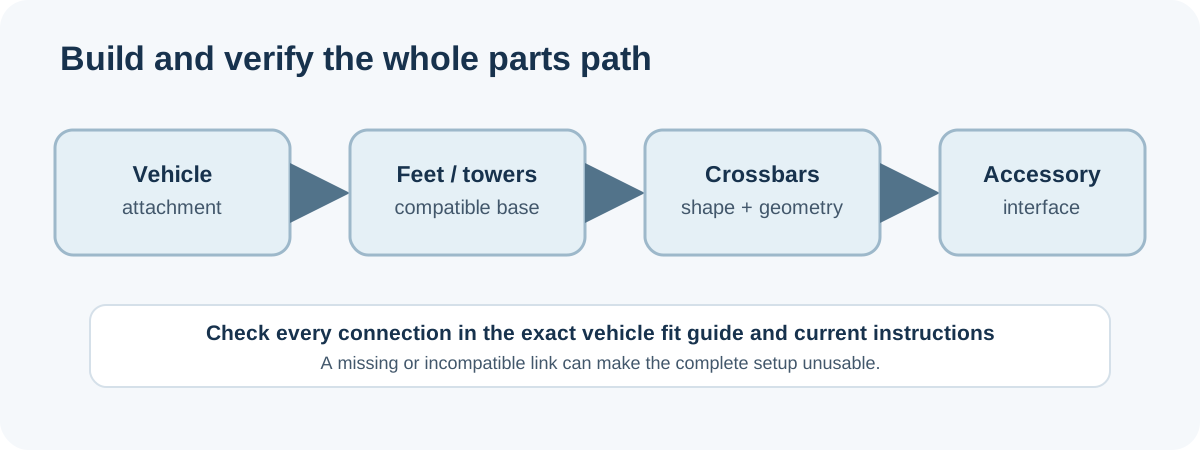
Crossbars also need the right length, shape, height, spread, and accessory interface. Measure the installed bars and compare them with the accessory’s current instructions. Check hatch, door, sunroof, and garage clearance with the accessory in place. Crossbar geometry and mounting interfaces covers those checks in detail.
Check fit, instructions, and capacity together
- Record the vehicle’s market, model year, body, trim, and roof hardware. Photograph the roof if a selector asks you to distinguish configurations.
- Select that exact vehicle in the rack maker’s current fit guide. Record the complete system and the instructions for its feet, kit, and bars.
- Check that the accessory fits the installed bar interface and geometry. A broad “fits most bars” statement is not a vehicle fit result.
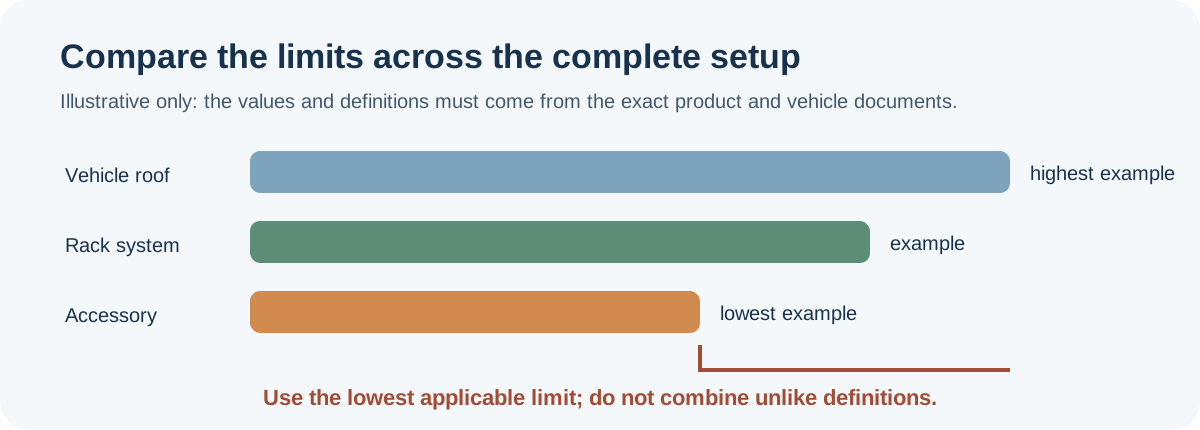
- Read the vehicle, rack, and accessory limits. The lowest applicable limit controls; use each maker’s definition of roof load and account for the installed rack and accessory where the vehicle limit includes them.
- Stop and ask the manufacturer or a qualified fitter when the selector has no result, the hardware is unclear, or instructions conflict. Do not turn a missing result into a safe-fit claim or a definitive no-fit claim.
An ordinary two-bar setup is only one system family. Rhino-Rack’s US guide separates crossbar-and-leg systems from its leg/backbone and Pioneer platform path. Channel platforms, truck or van utility racks, and standalone adapters have different mounting and load paths. Route those questions to the relevant guide instead of treating every roof-mounted structure as a longer crossbar. For a vehicle-specific example, see the Subaru Crosstrek guide; if the vehicle has changed, use the rack-transfer checklist.
Sources and product references
Use these references to check the current instructions and fit information for your market and exact setup.
- Which Roof Rack Fits Your Vehicle? Depends on Your Roofspecialist
- Everything you need to know about roof racksprimary
- Thule Fit Kitsprimary
- Roof Rack Buying Guideprimary
- Car roof racks — United Statesprimary
- Car roof racks — Canadaprimary
- Car roof racks — United Kingdomprimary