Compare common roof-rack mounting interfaces and learn what product and dimensions to verify before choosing an adapter.
On this page
T-Track, Around-Bar, Clamp, and Platform-Channel Adapters Explained
An adapter is useful only when it matches both sides of a connection. The words “T-track,” “T-slot,” “channel,” or “clamp” describe a mounting approach; they do not prove that two products share the same dimensions or are approved together. Identify the exact bar or platform and accessory before choosing hardware.
Common interface types
| Interface | Where it connects | What to verify |
|---|---|---|
| Vehicle fit kit or fixed-point hardware | The vehicle roof and the rack feet or towers | Exact vehicle, market, roof configuration, foot/tower family, and current fitting instructions |
| T-track or T-slot | A bolt or adapter slides into a channel in a crossbar | Slot shape and size, bolt form, accessory model, and the maker’s listed bar families |
| Around-bar mount or U-bolt | Hardware passes around or grips the outside of a bar | Bar profile, width and height limits, clearance, and the exact carrier or fitting-kit instructions |
| Clamp | A jaw or clamp grips a named bar or component | The supported bar family and shape, contact points, tightening method, and clearance |
| Platform channel | Hardware engages a channel in a platform or tray | Platform generation, channel geometry, included or separate bolts, and the accessory’s mounting pattern |
| Bracket or attachment plate | A bridge joins two named rack, tray, or accessory parts | Exact part numbers, fasteners, installation diagrams, and any required base bracket |
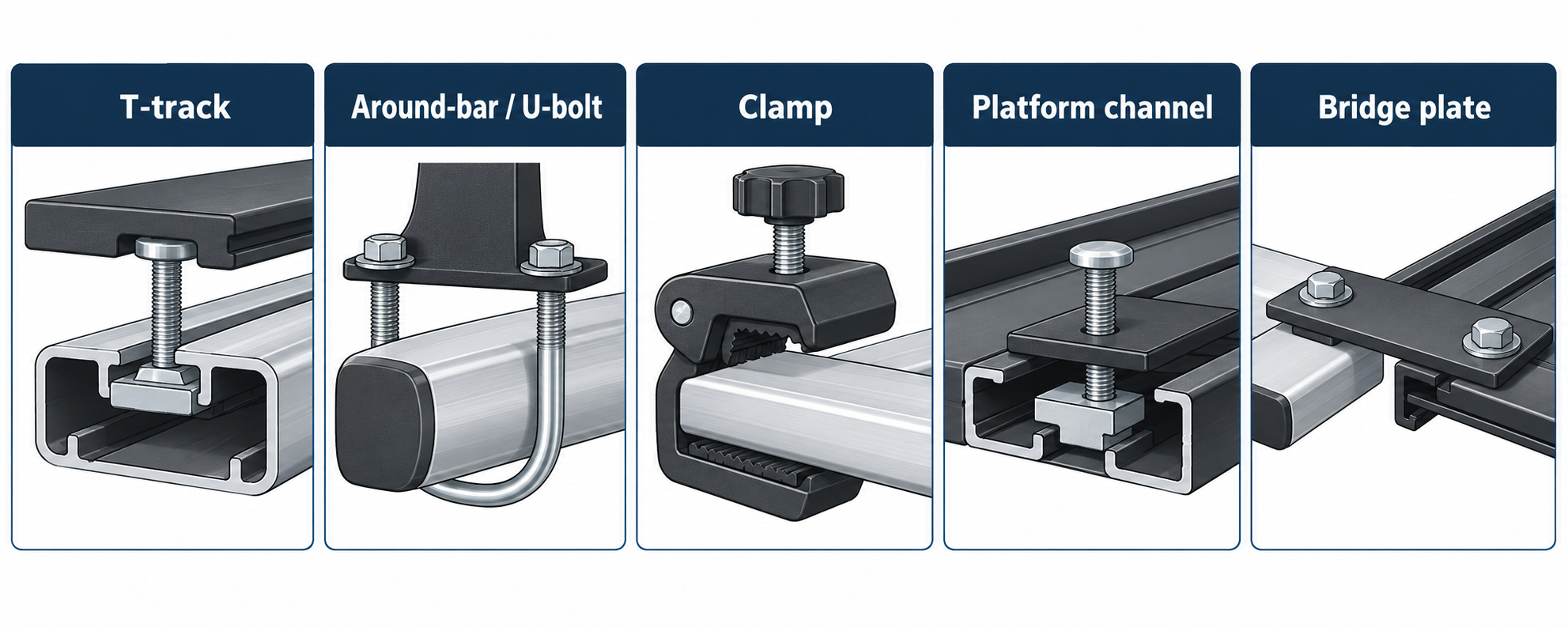
These labels are not interchangeable. A T-track adapter may be intended for a roof box, while a different T-slot kit converts the mounting hardware of a named bike or snow-sport carrier. A platform channel may use another bolt form again. Match the maker’s product relationship and dimensions instead of selecting by label alone.
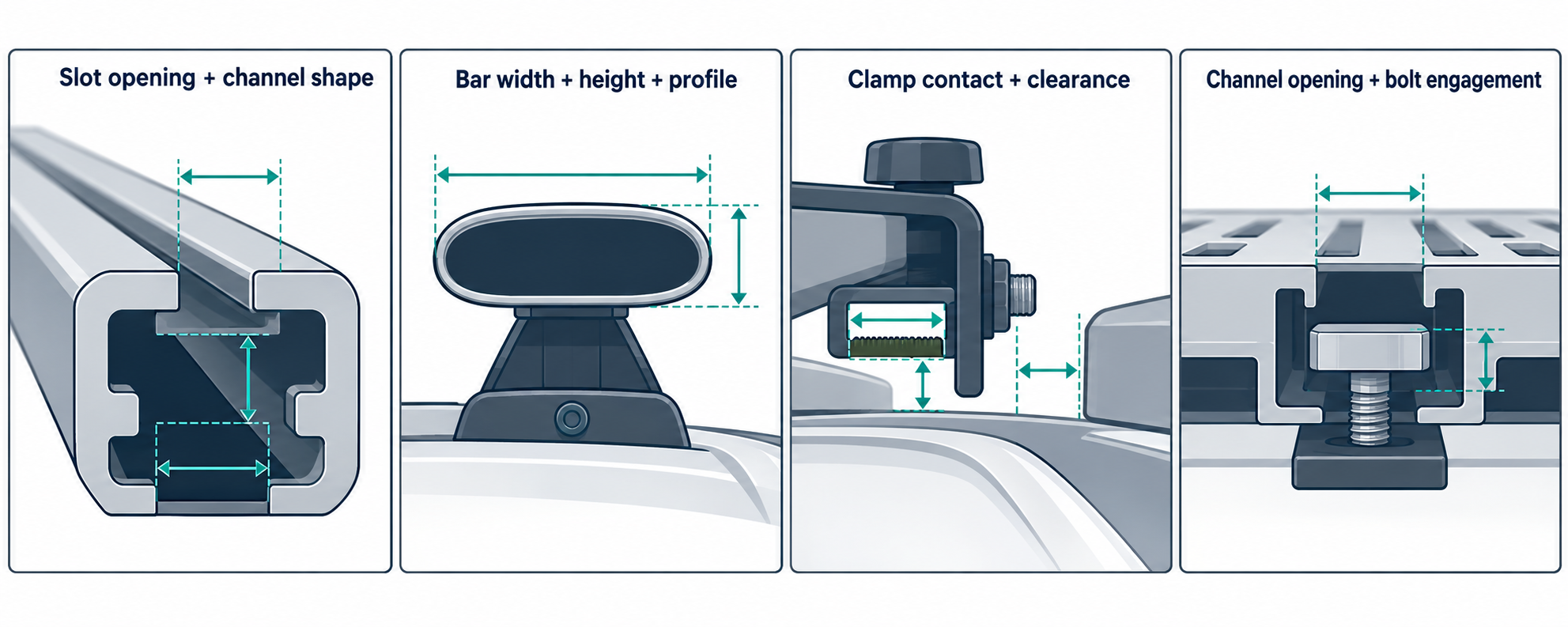
Product examples show why the exact model matters
Thule’s Hull-a-Port Aero has a product-specific path into named bar tracks and an around-bar path; Thule says its SquareBar requires a separate adapter. That is a carrier-to-bar example, not a general rule for every Thule carrier or square bar.
Yakima’s SmarT-Slot Kit 2 is listed for FatCat and FatCat EVO snow mounts. The current product page names JetStream, FlushBar, RailBar, and “most other” T-slot crossbars, but that phrase is not an exhaustive slot-geometry list. It also calls for a separately sold Cam Lever Set on FatCat units from 2006–2011. Confirm the exact mount generation and bar before ordering.
Yakima’s 21 mm Slot Adapter is a separate LockNLoad platform-channel product from its T-slot conversion kits. Its Australia and New Zealand page says the adapter sits in the LockNLoad accessory slot and accepts specified T-bolt forms; the T-bolts are sold separately. This regional product page does not establish a US, Canadian, or UK equivalent or approve another platform channel.
Rhino-Rack’s KC-FK8 page illustrates a named carrier-and-bar relationship: its listed kayak-carrier models and bar families are specific to that kit. The listed Thule bar names do not establish a fit for every Thule bar, carrier, vehicle, or product generation.
Some adapters bridge components inside the base rack itself. Yakima’s US HD Bar SL Adapter (SKU 8003541) is required to use an HD Bar with StreamLine towers. Its product page lists BaseLine, TimberLine, SkyLine, SightLine, TrackTower, and RidgeLine towers. This is a bar-to-tower relationship only; it does not establish that a particular tower and bar fit a vehicle. Follow the current instructions for the exact rack system.
Rhino-Rack’s Attachment Plate Kit 43105 instructions show a different bridge: existing Heavy Duty crossbars to a Pioneer tray. The cited Issue 03 document is dated 21 December 2015 and does not establish whether a newer issue exists, an exact tray generation, vehicle fit, load limit, or torque. Treat it as a part-identification example and confirm current instructions for the exact system before installing a plate kit. Any modification shown in that older drawing is specific to its depicted setup, not general drilling guidance.
Verify an interface before installing
- Identify the two components the adapter is meant to join: vehicle to base rack, base rack to carrier, or platform to accessory.
- Record the brand, product name, part number, and generation on each component. Use photos and measurements to help identify parts, not as proof of compatibility.
- Open the current product page and the instructions for the exact market and models. Check the listed bar or platform family, slot or profile requirements, included hardware, and any separately sold part.
- Follow the specific installation method and movement or fastener checks in those instructions. A torque or lever-force value belongs only to the procedure that states it.
- Check the complete vehicle, rack, accessory, and cargo limits and clearances. An interface match alone does not establish a safe vehicle fit.
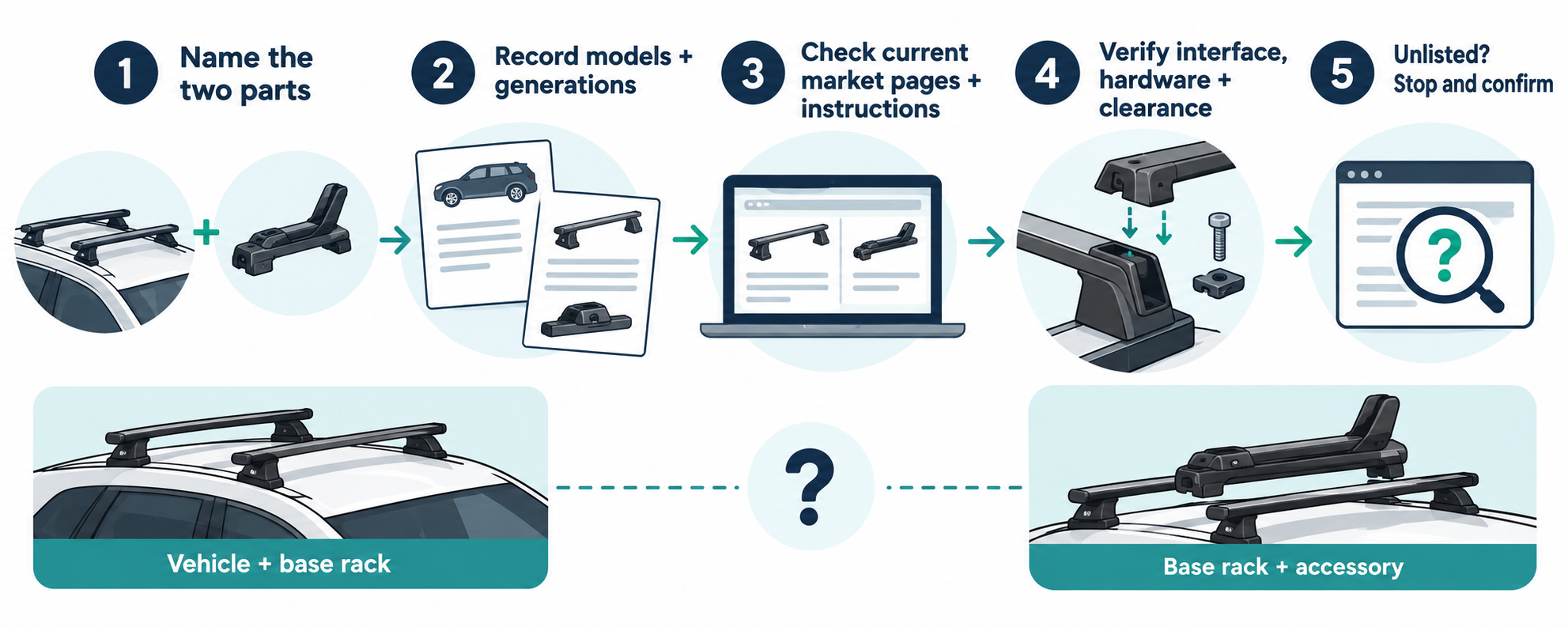
If a product page says “most” or the exact combination is absent, treat the fit as unconfirmed. Ask the manufacturer or an authorized fitter before adapting hardware, drilling, or loading the setup.
Sources and product references
Use these references to check the current instructions and fit information for your market and exact setup.